Introducing the Prompts table
One of the most requested features from brands using Glara is now live. The Prompts table shows every query Glara tracks for your brand and exactly which competitors are showing up in the same AI answers. Here is how it works and why the updated prompt generation makes your visibility data more accurate than ever.
Glara Team
|
See every prompt Glara tracks for your brand, and every competitor that appears alongside you
One of the most requested features from brands using Glara is now live. The new Prompts table gives you a clear view of the specific queries Glara tracks for your brand, and for each one, which competitors are showing up in the same AI answers. It is one of those features that sounds straightforward but changes how you actually use the product day to day.
Why prompts matter more than most teams realise
When Glara tracks your AI visibility, it does so by running a defined set of prompts across ChatGPT, Gemini, and other AI assistants, and recording which brands appear in the answers. The quality and relevance of those prompts directly affects how accurately your visibility data reflects what is actually happening in AI search.
If the prompts are too generic, you get an incomplete picture. If they do not match how real shoppers phrase things, the data does not reflect real buying intent. And if you cannot see which prompts are driving which results, it is hard to know where to focus your optimization work.
The new Prompts table solves all of this.
How prompts are now generated
We have significantly refined how Glara generates prompts for your brand. Previously, prompts were largely keyword-driven. They were accurate but often sounded like search queries rather than the kind of natural, conversational questions shoppers actually ask AI assistants.
The updated approach draws on four sources:
Real search data from Google Search Console where connected, so prompts reflect the actual queries driving traffic to brands in your category. Live keyword volumes from search analytics tools, so higher-volume intents are prioritized. Real user language from community and review platforms, so prompts reflect how people actually talk about products. Your onboarding input, so prompts stay relevant to your specific brand context and category.
Every prompt is also evaluated on two dimensions before it enters your tracking set: whether a real person would actually phrase it that way, and whether it is genuinely relevant to your brand and category. Prompts that fail either check are removed.
The result is a set of prompts that behave more like real shopper queries and less like SEO inputs.
How the Prompts table works
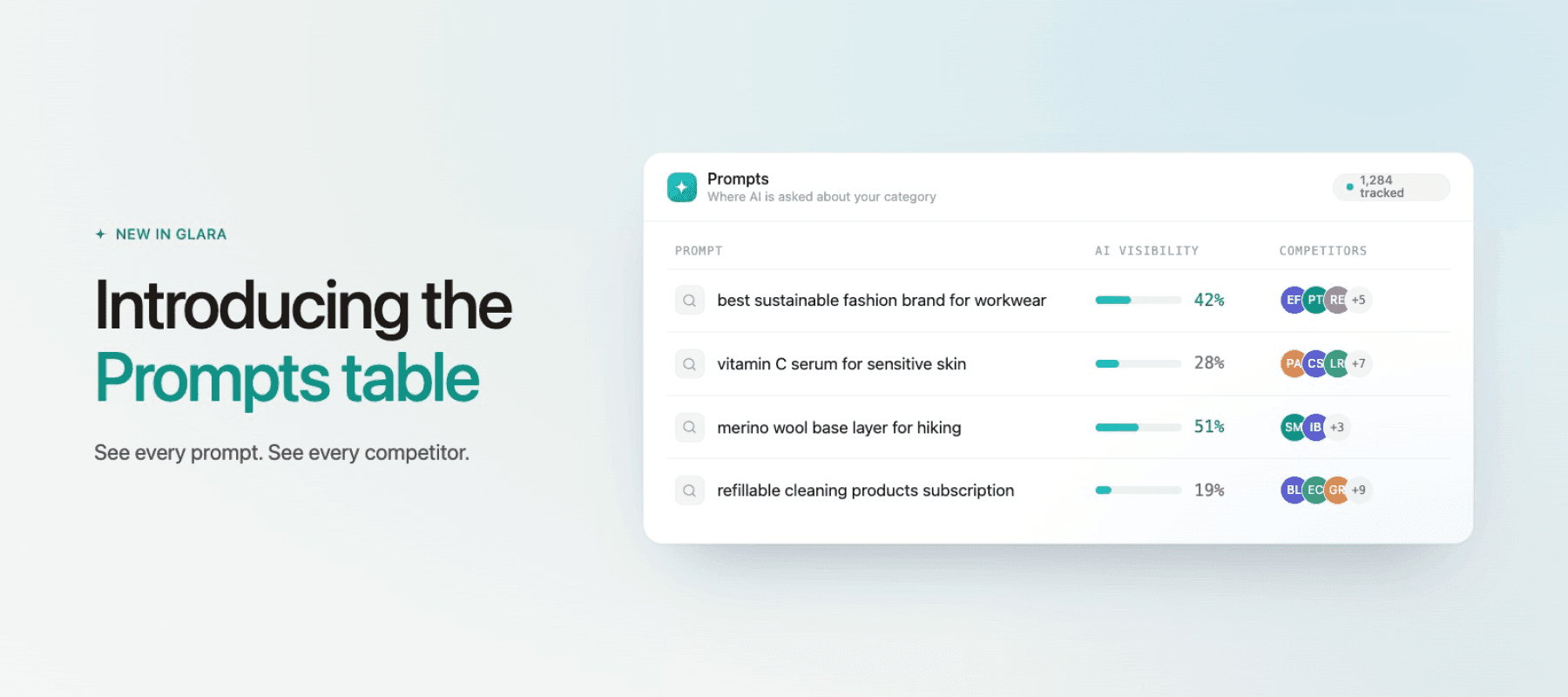
The Prompts table gives you full visibility into what Glara is tracking for your brand. For every prompt in your set, you can see your AI visibility score for that prompt, which competitors appear alongside you in AI answers for that query, how often the prompt has been run, and which of your products were recommended in each prompt.
This makes it possible to see not just your overall visibility score but the specific queries driving it. Where you are winning, where a competitor is taking the spot, and which prompts represent the biggest opportunity to improve.
How to use it
Click on Prompts in the sidebar
Search and review the prompts Glara tracks for your brand
Check AI visibility, visible competitors, runs, and highlighted products per prompt
Use the data to identify which queries to prioritize in your optimization work
Not yet a Glara customer? Reach out and we will show you how it works.
The Prompts table is read-only to start. You can view and search all prompts currently tracked for your brand. Editing functionality is coming in a later release.
The prompt set has been significantly refined to better reflect how real shoppers phrase things in AI search. As a result you may see some movement in your visibility numbers. This reflects more accurate tracking rather than a change in how your brand actually performs. Your traffic and revenue data stays exactly the same.
Glara draws on four sources: real search data from Google Search Console where connected, live keyword volumes, real user language from community and review platforms, and your onboarding input. Every prompt is also evaluated on whether a real person would phrase it that way and whether it is relevant to your brand and category before it enters your tracking set.
Prompts are reviewed and updated regularly to stay aligned with how shoppers are actually searching. You will be notified if significant changes affect your tracking set.

Create an account to track your AI visibility and start your 7-day free trial once setup is done.